# 9. 報名系統如何串接第三支付?

##### **<span style="color: rgb(224, 62, 45);">這個功能在設定報名系統的第三支付的金流串接</span>** 

##### <span style="color: rgb(0, 0, 0);">**綠界金流申請** </span>

##### <span style="color: rgb(224, 62, 45);">**<span style="color: rgb(0, 0, 0);">綠界官網</span>  
[https://www.ecpay.com.tw/](https://www.ecpay.com.tw/)** </span><span style="color: rgb(224, 62, 45);"> **<span style="color: rgb(0, 0, 0);">註冊頁面</span>  
[https://member.ecpay.com.tw/MemberReg/MemberRegister?back=N](https://member.ecpay.com.tw/MemberReg/MemberRegister?back=N)** </span>


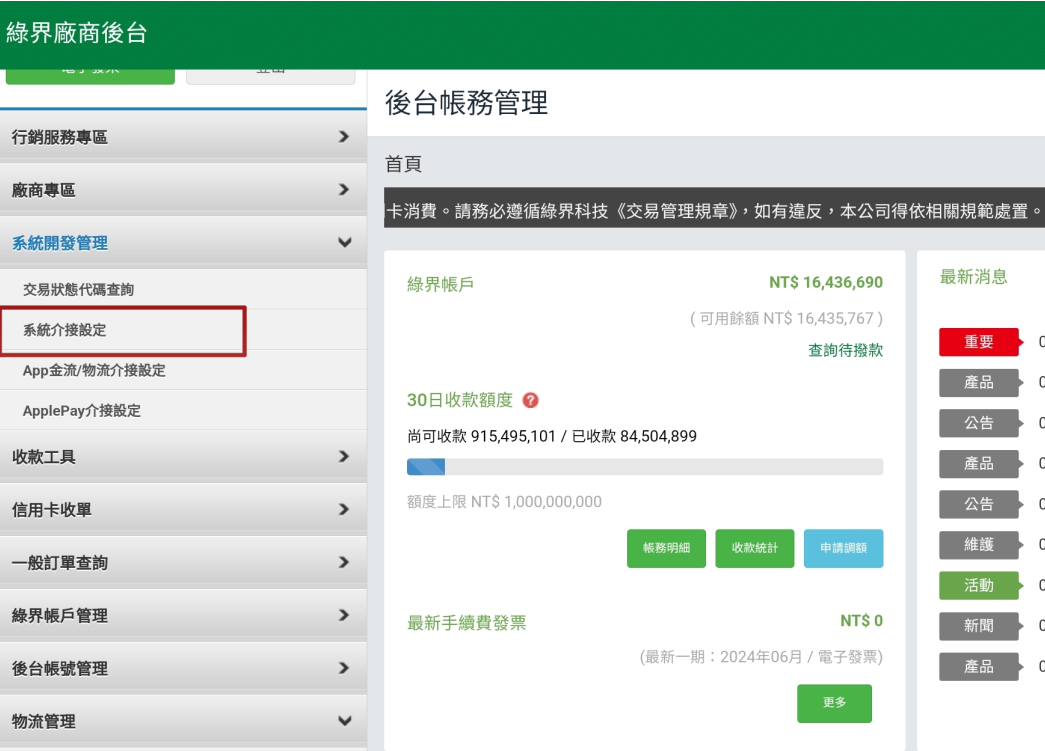
##### <span style="color: rgb(224, 62, 45);">**<span style="color: rgb(0, 0, 0);">1. 先登入您申請的率界廠商後台</span>**</span>

[![signup_ecpay-a01.png](https://km.sopdom.com/uploads/images/gallery/2025-03/scaled-1680-/signup-ecpay-a01.png)](https://km.sopdom.com/uploads/images/gallery/2025-03/signup-ecpay-a01.png)

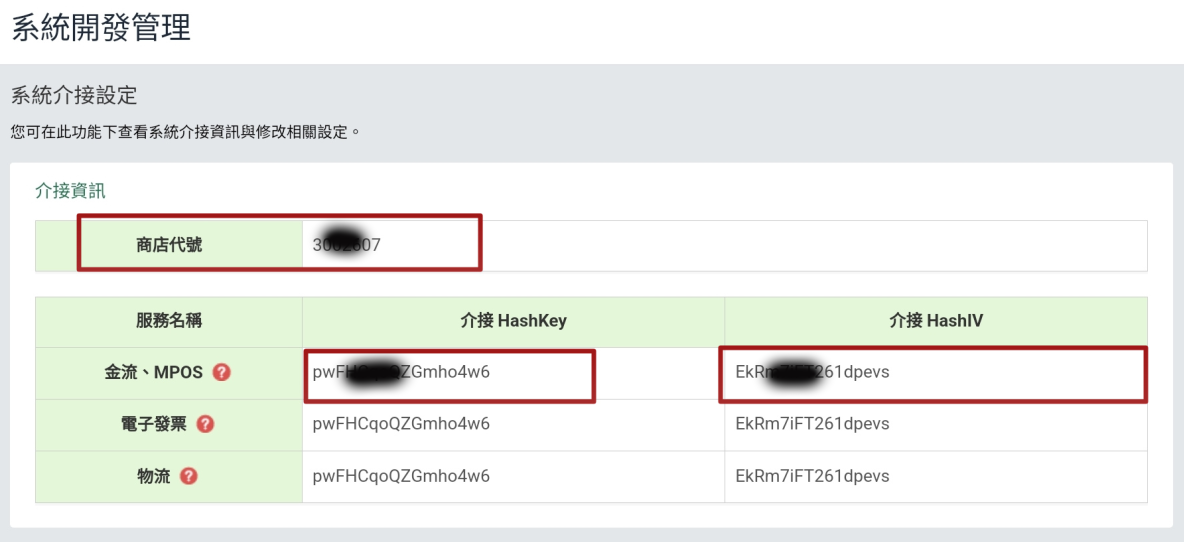
##### <span style="color: rgb(224, 62, 45);">**<span style="color: rgb(0, 0, 0);">2. 選單系統界面設定, 如下圖所示</span>** 複製如下三個key  
<span style="color: rgb(0, 0, 0);">1. 商家代號</span>  
<span style="color: rgb(0, 0, 0);">2. 介接</span></span><span style="color: rgb(0, 0, 0);">HashKey  
3. 介接 HashIv  
  
</span>

[![signup_ecpay-a02.png](https://km.sopdom.com/uploads/images/gallery/2025-03/scaled-1680-/signup-ecpay-a02.png)](https://km.sopdom.com/uploads/images/gallery/2025-03/signup-ecpay-a02.png)

#####   


##### **<span style="color: rgb(224, 62, 45);"><span style="color: rgb(0, 0, 0);">3. 登入超融合後台</span></span>**

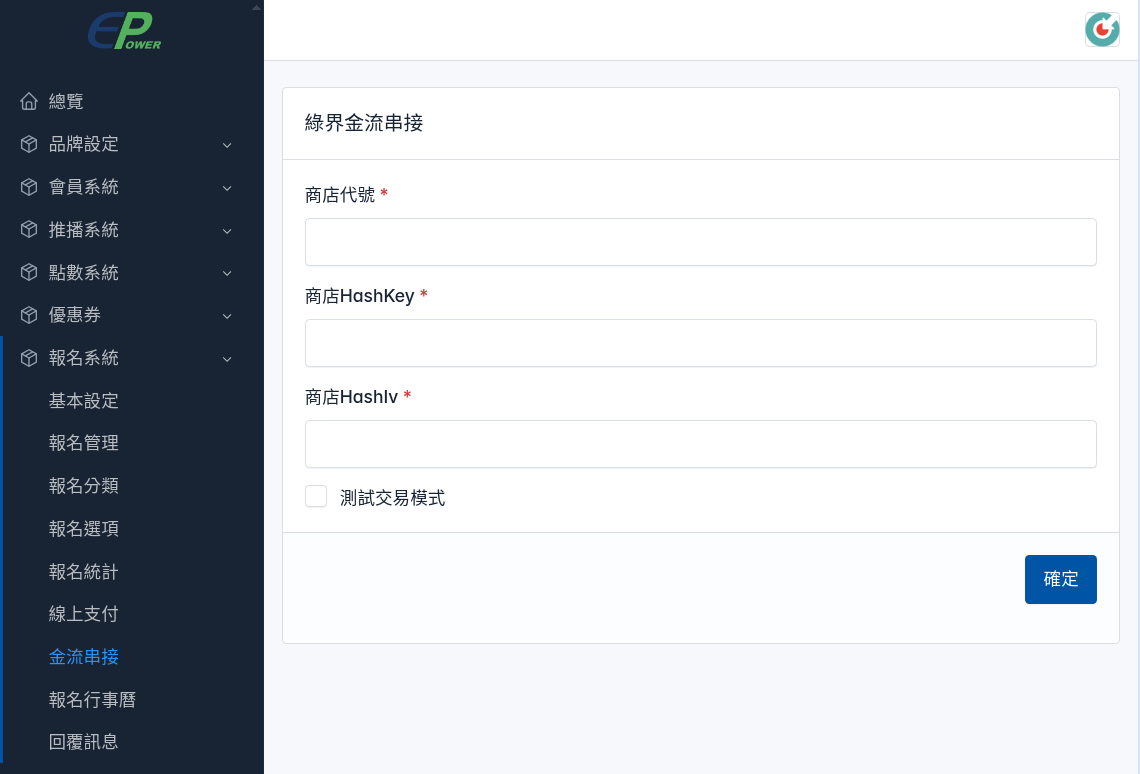
#####  **設定步驟** 功能選單 -&gt; 報名系統 -&gt; 金流串接

#####   
<span style="color: rgb(224, 62, 45);">**串接綠界第三支付**</span>  


##### **商店代號** 貼上綠界提供的 <span style="color: rgb(224, 62, 45);">商店代號</span>

##### **商店HashKey** 貼上綠界提供的 <span style="color: rgb(224, 62, 45);">商店HashKey</span>

##### **商店HashIv** 貼上綠界提供的 <span style="color: rgb(224, 62, 45);">商店HashIv</span>

##### **測試交易模式** <span style="color: rgb(224, 62, 45);">正式線上Key請記得要不要句選</span>

[![signup_ecpay-i02.png](https://km.sopdom.com/uploads/images/gallery/2025-03/scaled-1680-/signup-ecpay-i02.png)](https://km.sopdom.com/uploads/images/gallery/2025-03/signup-ecpay-i02.png)

#####   


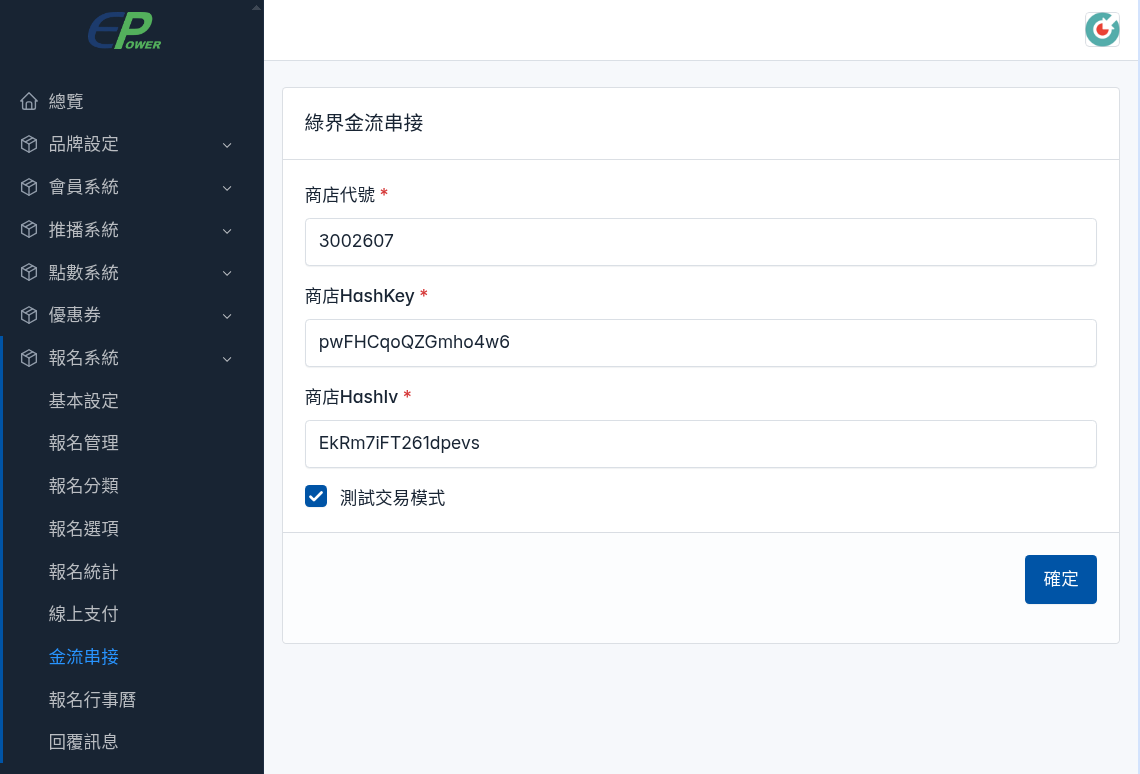
<span style="color: rgb(224, 62, 45);">**綠界提供的測試交易帳號** </span>

##### **商店代號:** <span style="color: rgb(224, 62, 45);"><span style="color: rgb(0, 0, 0);">3002607</span>  
</span>

##### **商店HashKey:** <span style="color: rgb(224, 62, 45);"><span style="color: rgb(0, 0, 0);">pwFHCqoQZGmho4w6</span>  
</span>

##### **商店HashIv:** <span style="color: rgb(224, 62, 45);"><span style="color: rgb(0, 0, 0);">EkRm7iFT261dpevs</span>  
  
<span style="color: rgb(0, 0, 0);">測試要句選</span> **交易測試模式** </span>

[![signup_ecpay-i01.png](https://km.sopdom.com/uploads/images/gallery/2025-03/scaled-1680-/signup-ecpay-i01.png)](https://km.sopdom.com/uploads/images/gallery/2025-03/signup-ecpay-i01.png)